My Emacs Configuration
My personal configuration
Design
I belive that one should explore what one has before finding something new. And so, why would one install packages for Emacs?
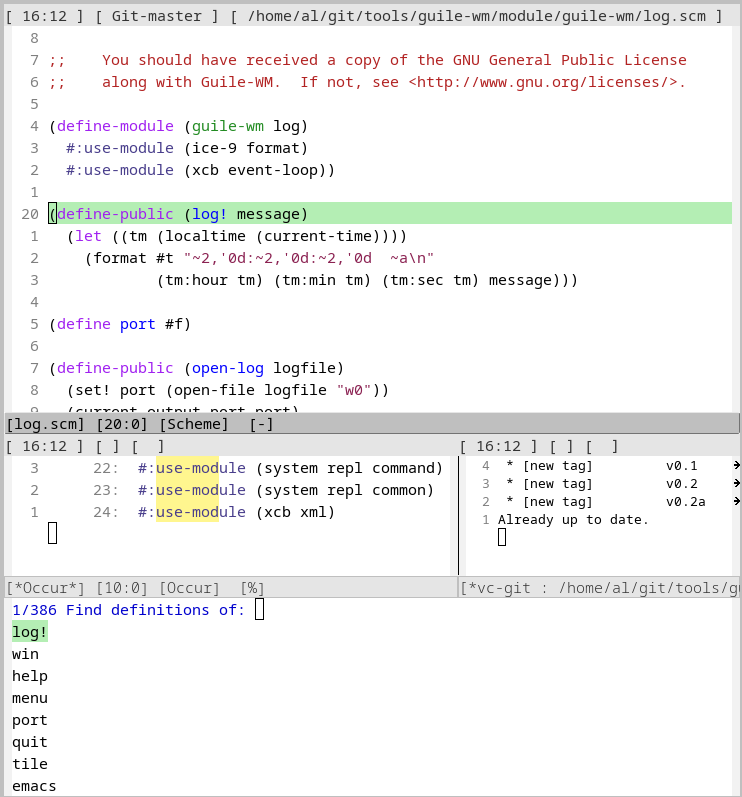
I've used it as my main editor for a while now, and have yet to find something I miss built-in to the editor and tool.
Let us take an example, magit and vc-mode. Magit is a popular git frontend for emacs, which many see as one of the best features of the tool. But why?
I have talked to multiple people that have never even looked at the built-in alternative, vc-mode.
In vc-mode I can easily stage files with one keybind, push, pull, stash, use git tags, don partial commits and more with a simple UI. Once someone said they wished for a way to browse the git log, but vc-mode has just this, and from here you can see, edit and browse the log and open the diffs from each commit.
This is just one of many examples of tooling in Emacs that many simply have never tried or even know of.
This is the base idea for my configuration. Use what I have and check what I have before I go looking for an external tool or package to solve a problem I may already have a tool for avalable.
At the moment I have 0 external packages for my Emacs configuration, and if you use emacs version 30.1 or above you will have all that I use, where which-key is the notable new feature.
If you want everything you may check my configuration over at Codeberg.
I have structured my configuration so that first i set the options, then i set values then last comes functions and keybinds. Like this:
  (option 0/nil)
  (setq option value)
  (defun func (function))
  (mode-set-key (kbd "keybind") 'function)
my configuration
First i require some shipped packages so that i am 100% sure they are loaded first thing, before the configurations are set (mostly for diary).
  ;;; minimal configuration
  (require 'diary-lib)
  (require 'rmail)
  (require 'erc)
After that I set all the options that are toggles, like fido-vertical-mode and electric-pair-mode.
  ;;; basic opetions
  (electric-pair-mode                1)
  (fido-vertical-mode                1)
  (repeat-mode                       1)
  (which-key-mode                    1)
  (save-place-mode                   1)
  (global-hl-line-mode               1)
  (savehist-mode                     1)
  (recentf-mode                      1)
  (global-auto-revert-mode           1)
  (global-display-line-numbers-mode  1)
  (column-number-mode                1)
  (display-time-mode                 1)
  (global-completion-preview-mode    1)
  ;;(etags-regen-mode                  1)
Here I just disable the visual clutter that is UI buttons.
  ;;; clean the UI
  (tool-bar-mode   0)
  (menu-bar-mode   0)
  (scroll-bar-mode 0)
Then I set hooks, commands that are autoran on a condition, like for example startup or a specific mode.
  ;; autohooks
  (add-hook  'before-save-hook              'delete-trailing-whitespace     )
  (add-hook  'prog-mode-hook               #'prettify-symbols-mode         )
  (add-hook  'org-mode-hook                #'prettify-symbols-mode         )
  (add-hook  'scheme-mode-hook             #'imenu-add-menubar-index       )
  (add-hook  'diary-fancy-display-hook      'diary-fancy-display    )
  (add-hook  'calendar-mode-hook            'shrink-window-if-larger-than-buffer )
  ;;; binds: d - diary selected date, s: diary file, i d; insert diary,
Here I set it to pulse, so visually highlight the line for a moment on the specified commands.
  ;;; advice add
  (advice-add 'find-file         :after #'my/pulse-line)
  (advice-add 'switch-to-buffer  :after #'my/pulse-line)
  (advice-add 'my/move-line-down :after #'my/pulse-line)
  (advice-add 'my/move-line-up   :after #'my/pulse-line)
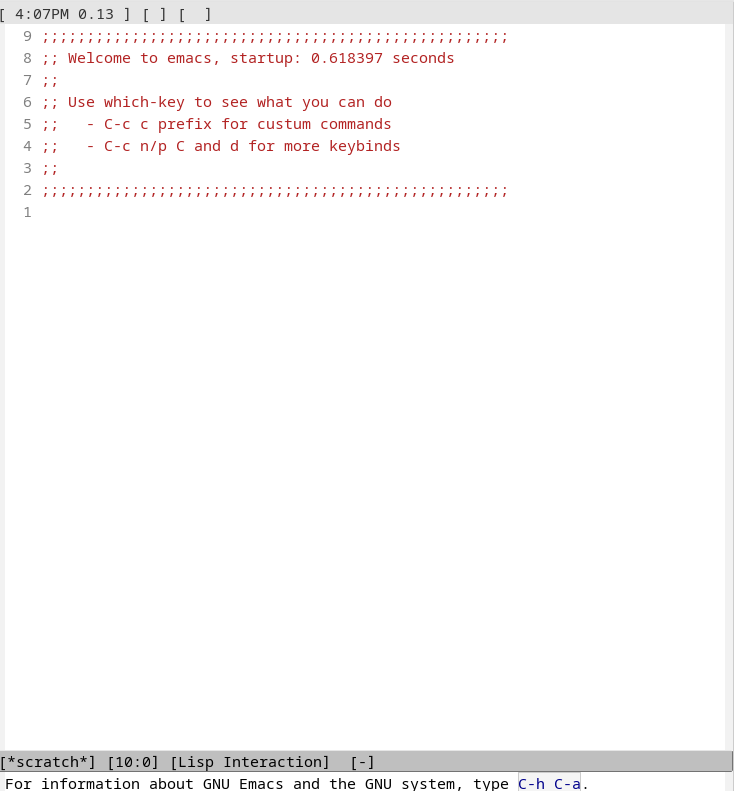
After that I start to set all the setq options. Here I make a better startupscreen and set how much emacs should remember back in time with actions like file naviagtion.
  ;;; remember what i did
  (setq recentf-max-saved-items 100
        history-length          100
        kept-new-versions       10
        inhibit-splash-screen   t
        initial-scratch-message ""
        inhibit-startup-screen t
Then i set the diary file and for it to auto follow symlinks to vc managed directories for my startup screen.
  ;;; diary
        vc-follow-symlinks t
        diary-file "~/diary"
        calendar-date-style 'iso
And now I set where backupfiles are saved.
  ;;; set backups to .emacs.d and disable the bell
        ring-bell-function 'ignore
        display-line-numbers-type 'relative
        backup-directory-alist `(("." . ,user-emacs-directory))
        auto-save-file-name-transforms
        `((".*" ,user-emacs-directory t))
        auto-save-list-file-prefix
        user-emacs-directory
This is a simple `ERC` setup.
  ;;; irc
        epa-pinentry-mode 'loopback
        auth-sources '("~/.authinfo.gpg")
        erc-nick "Trondelag-Alice"
        erc-user-full-name "Trondelag"
        erc-autojoin-channels-alist '(("libera.chat" "#technicalrenaissance"))
        erc-use-auth-source-for-nickserv-password t
        erc-hide-list '("JOIN" "PART" "QUIT" "NICK" "MODE")
        erc-prompt-for-password nil
Options for xref and how it behaves, for M-./M-g i.
  xref-show-definitions-function #'xref-show-definitions-completing-read
  xref-show-xrefs-function       #'xref-show-definitions-completing-read
  xref-auto-jump-to-first-definition 'unique
Simple rmail/email setup.
  ;;; email
         user-full-name "Alice"
         user-mail-address "trondelagcutie@yahoo.com"
         send-mail-function 'smtpmail-send-it
         smtpmail-smtp-server "smtp.mail.yahoo.com"
         smtpmail-smtp-service 465
         smtpmail-stream-type 'ssl
         rmail-movemail-program "/usr/local/bin/movemail"
         rmail-primary-inbox-list '("imaps://trondelagcutie%40yahoo.com@imap.mail.yahoo.com:993")
How emacs make backupfiles.
  ;;; how to backup
        backup-by-copying   t
        delete-old-versions t
        version-control     t
        create-lockfiles    nil
  ;;; CLOCK IN MODELINE FORMAT
        display-time-24hr-format t
        display-time-default-load-average nil
Y-N insted of yes-no.
  ;;; small options
        use-short-answers t
        tags-revert-without-query t
My completion style and how it shows up.
  ;;; completions
  completion-styles '(basic partial-completion flex file-name)
        completions-format 'vertical
        completions-format 'one-column
        completions-max-height 8
        icomplete-scroll t
        tab-always-indent 'complete
        savehist-additional-variables '(kill-ring search-ring regexp-search-ring)

        completion-preview-minimum-symbol-length 2
        completion-preview-delay 0.02
        display-buffer-alist
        '(("\\*Completions\\*"
           (display-buffer-at-bottom)
           (window-height . 10)))

        completion-auto-select t
        completions-detailed t
        completions-max-height 10
        icomplete-prospects-height 10

        completions-group-format (propertize " %s " 'face '(:inherit shadow :slant italic))

        completions-group t
        read-file-name-completion-ignore-case t
        read-buffer-completion-ignore-case t
Enable symbol replacement for things like lambda to be shown as the lambda symbol.
  ;;; prettify the symbols
        prettify-symbols-unprettify-at-point t)
Set options to have smooth scrolling, show trailing whitespace.
  ;;; smoother scrolling
  (setq-default scroll-conservatively 101
                scroll-margin 10
                indent-tabs-mode nil
  	      buffer-file-coding-system 'utf-8-auto-unix
  	      show-trailing-whitespace t
                imenu-auto-rescan t
Set what to show in the modeline.
  ;;; modeline
                header-line-format '("[ "display-time-string"] "
                                     "["vc-mode" ] " "[ %f ]")
                mode-line-format '("%e" "[%b] " "[%l:%c] "
                                   "["mode-name"] " " [%*] ")
Sets which symbols should be affected by prettify.
                prettify-symbols-alist
                '(("==" . "≡") ("===" . "≣") ("!=" . "≠") ("!==" . "≢")
                  (">=" . "≥") ("<=" . "≤") ("->" . "→") ("<-" . "←")
                  ("<->" . "↔") ("<=>" . "⇔") ("->>" . "↠") ("<<-" . "↞")
                  ("~>" . "↝") ("|>" . "▷") ("<|" . "◁") ("map" . "↦")
                  ("lambda" . "λ") ("alpha" . "α") ("beta" . "β") ("gamma" . "γ")
                  ("delta" . "δ") ("pi" . "π") ("sum" . "∑") ("..." . "…")
                  ("::" . "∷") (">>" . "»") ("<<" . "«") ("sqrt" . "√")
                  ("integral" . "∫") ("forall" . "∀") ("exists" . "∃")))
Enable recursive minibuffers for completion in minibuffers and a keymap for it.
  ;;; setopts
  (setopt enable-recursive-minibuffers t)

  ;;; eval after load
  (with-eval-after-load 'completion-preview
    (define-key completion-preview-active-mode-map (kbd "M-n") #'completion-preview-next-candidate)
    (define-key completion-preview-active-mode-map (kbd "M-p") #'completion-preview-prev-candidate))
Function that highlights line for a moment.
  ;;; smal defun
  (defun my/pulse-line (&rest _)
    (pulse-momentary-highlight-one-line (point)))
Function that moves selected line one line up.
  ;;; general functions
  (defun my/move-line-up ()
    (interactive)
    (transpose-lines 1)
    (forward-line -2))
Function that moves line one line down.
  (defun my/move-line-down ()
    (interactive)
    (forward-line 1)
    (transpose-lines 1)
    (forward-line -1))
A function that lets me have something like vims visual block mode for editing.
  (defun my/visual-block-mode ()
    "something like vims visual block to a keybind, so i can edit multiple lines at once for the same thing"
    (interactive)
    (unless cua-mode   (cua-mode 1))
    (cua-rectangle-mark-mode 1))
Finds directories down and gives it to find-file which has fuzzy search, so a fuzzy file finder, like ivy or fzf.
  (defun my/find ()
    "fuzzy from current directory"
    (interactive)
    (let* ((files (directory-files-recursively default-directory ""))
           (chosen (completing-read "Find file: " files)))
      (when chosen
        (find-file chosen))))
This remakes the `TAGS` file.
  (defun my/recompile-etags ()
    "a command to generate etags 'TAGS' file for the current projects"
    (interactive)
    (let ((default-directory (vc-root-dir)))
      (call-process-shell-command
       "find . -type f \\( -name '*.el' -o -name '*.[ch]' -o -name '*.scm' \\) -print0 | xargs -0 etags -o TAGS")))
A function that pushes current git repo withouth an ssh agent active.
  (defun my/push ()
    "git push so it works on my machine and setup"
    (interactive)
    (let ((display-buffer-alist
           '(("\\*Async Shell Command\\*"
              display-buffer-no-window))))
      (shell-command "git push &"))
    (message "Pushing..."))
Here I simple set some keybinds to my functions and some built-ins that I use a lot.
  ;;; keybinds
  (global-set-key (kbd "C-|"     ) 'my/visual-block-mode)
  (global-set-key (kbd "C-c c s ")  'eshell             )
  (global-set-key (kbd "C-c c g ")  'grep-find          )
  (global-set-key (kbd "C-c c f ")  'my/find            )
  (global-set-key (kbd "C-c c b ")  'ibuffer            )
  (global-set-key (kbd "C-c c r ")  'recentf            )
  (global-set-key (kbd "C-c C   ")  'compile            )
  (global-set-key (kbd "C-c p   ")  'my/move-line-up    )
  (global-set-key (kbd "C-c n   ")  'my/move-line-down  )
  (global-set-key (kbd "C-c d   ")  'duplicate-line     )
  (global-set-key (kbd "C-c c n ")  'narrow-to-region   )
  (global-set-key (kbd "C-c c w ")  'widen              )
  (global-set-key (kbd "C-c c P ")  'my/push            )
Sets move line functions to be repeatable.
  (windmove-default-keybindings 'shift)
  ;;; repetemodeable
  (defvar-keymap move-line-repeat-map
    "p" #'my/move-line-up
    "n" #'my/move-line-down)
  (put #'my/move-line-down 'repeat-map 'move-line-repeat-map)
  (put #'my/move-line-up   'repeat-map 'move-line-repeat-map)
Makes the base startup-screen the diary for the next week.
  (defun my/start ()
    (diary 7)
    (delete-window))
  (add-hook 'emacs-startup-hook 'my/start)